Recent Posts (page 16 / 71)

by Leon Rosenshein

What Is Technical Debt Anyway?
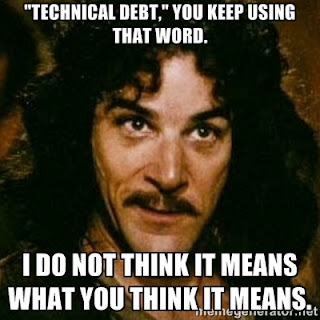
Inigo Montoya saying Technical Debt. You keep using that word. I do not think it means what you think it means.

Technical debt has been on my mind a bunch the last few weeks. The system I’m working on has been around for a few years. It works, and it works successfully. However, since Day 1 we’ve learned a lot about what we want the system to do, what we don’t want it to do, and the environment it will be operating in. Some of those things fit into the original design, some didn’t.

According to Ward Cunnigham, who coined the term, technical debt is not building something you know is wrong, with the intent of fixing later. You always build things the best way you can, given what you know at the time. Technical Debt happens when you learn something new. Instead of refactoring the code to make it match the new knowledge you make the minimal change to the code to get the right answer, usually in the interest of time.

Two things to keep in mind here. First, when he coined the term, Ward was talking to financial analysts. People who were extremely familiar with the concept of debt and taking on debt to meet a short term need. They also understood the imperative of paying off that debt and the fact that if you didn’t pay off the debt you would eventually go bankrupt. They understood the context. That you can’t just keep increasing your debt and expect there to be no consequences.

Second, technical debt is NOT doing things badly, worse than you could, ignoring your principles and patterns, with the idea that you’ll do it right later. It’s not building a big ball of mud, without clearly separating your domains. It’s not hard-coding your strings everywhere because it’s easier or using exception handling for standard flow control. That’s just bad design and something that we should avoid.

Rather, Technical Debt is choosing to not refactor when you learn something new. You avoid going into “technical debt” by doing whatever refactoring is needed to ensure that that code models what you know about the system/domain. Doing anything else is considered tech debt. Once you have some tech debt you have to pay interest on it. That interest comes in the form of overhead, making it more difficult to make the next change when you learn something else. Eventually you end up in a situation where it’s almost impossible to make the change because the interest on the debt is so high.

There’s a nuance there that needs to be called out. Technical debt is not what happens when you do the wrong thing. It’s what happens when don’t do the right thing. It’s what happens when you’re doing the best you can, learn something new, and then don’t incorporate it.

There’s a time to take on debt. Just like a business, sometimes you take on debt to do something new. To open a store, take on a new line of merchandise, or just run a new advertising campaign. You take on the debt, see the benefit, then pay off the debt.

Whatever you do, don’t use technical debt as an excuse to do less than the best you know how to do.
by Leon Rosenshein

Starting vs. Finishing

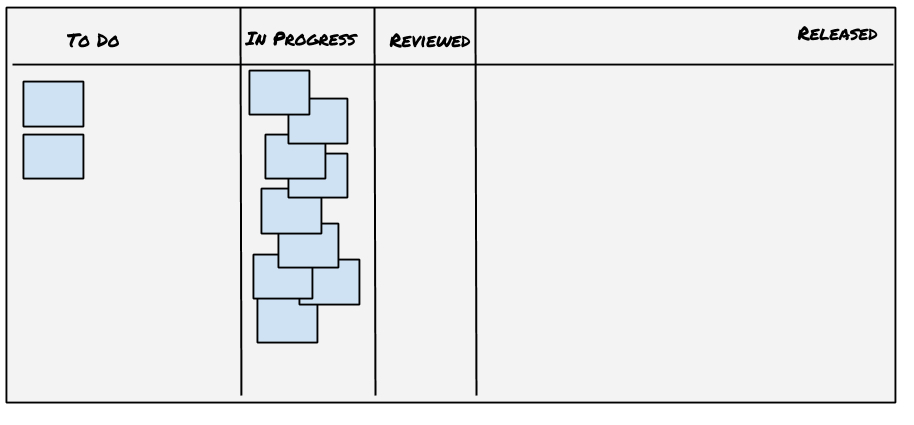
Picture of Kanban board
image source

What’s more important, starting or finishing? Being done is great, but you can’t finish something you haven’t started. To me, finishing is more important. Because if you don’t finish all you’ve done is waste your time (modulo any learning along the way). Of course, to finish you need to define what “finishing” means. This is critical because, especially in development, while finishing does NOT always mean delivered, it usually does, and that’s a place to start with the definition. You always need to be explicit about what done means. If it doesn’t mean delivered to customers then you need to be even more explicit. And clear that done means you don’t already know there’s more work you need to.

As I’ve said, finishing is more important. However, since you can’t finish what you don’t start, that means it’s at least as important, right? And if you want to finish as much as possible, it stands to reason that you want to start as many things as possible so you have something to finish, right? Wrong.

What’s why managing your Work in Progress (WIP) is so important. Contrary to expectations, the less you’re working on, the more you can finish. There are lots of reasons for this. The first is time lost to context switching. As I noted before, every context switch can take up to 20% of your time. It doesn’t take many context switches to run out of working time. Second, the more things you’re working on, the more opportunities you have for interruption. When you’re working on one thing there’s one group of people who will be interrupting you. It might be as simple as needing a status update, or it could be as complicated as a change in dates and requirements. Third, is increased cognitive load. It’s related to context switching, but even if you’re not switching, you’re carrying around all that extra context, which means you have less “space” to focus on what you’re currently working on.

Add to that a very human tendency to want to start things and you can easily end up with lots of WIP. I’m very guilty of this. It’s often easier and more fun to start a new task. Especially if it’s a completely new thing. Greenfield development is easier and lots of fun. You start out with learning and exploring and you don’t need to worry (too much) about what’s been done before. And even if you’re not doing greenfield work, you still get to learn and explore. Starting out is generally much less constrained. You have more freedom. Conversely, finishing something is all about constraints. Have you met all the constraints? Have you done all of the niggly lit bits that are needed. Have you dug deep enough to finish up and get to done?

Sometimes of tools don’t help. If you’re using a Scrum-like or Kanban-like process you want to see motion on the board. The easiest thing to do is move something from not started to in-progress. You get motion. The counter for time in state goes down. The more things you have on the board at any given time the more things can move around. You get the appearance of progress.

But it’s not real progress. Real progress is moving things to done. Getting them off the board. That frees up time, capacity, and cognitive load. It reduces context switches. It improves flow. It gives you more real progress.

So next time you get to a point where you have an opportunity to either start working on something new or helping someone else move something to done, consider trying out helping someone on the team get to done. You might be surprised at the overall result.

by Leon Rosenshein

What happens when you can't even Tidy First?

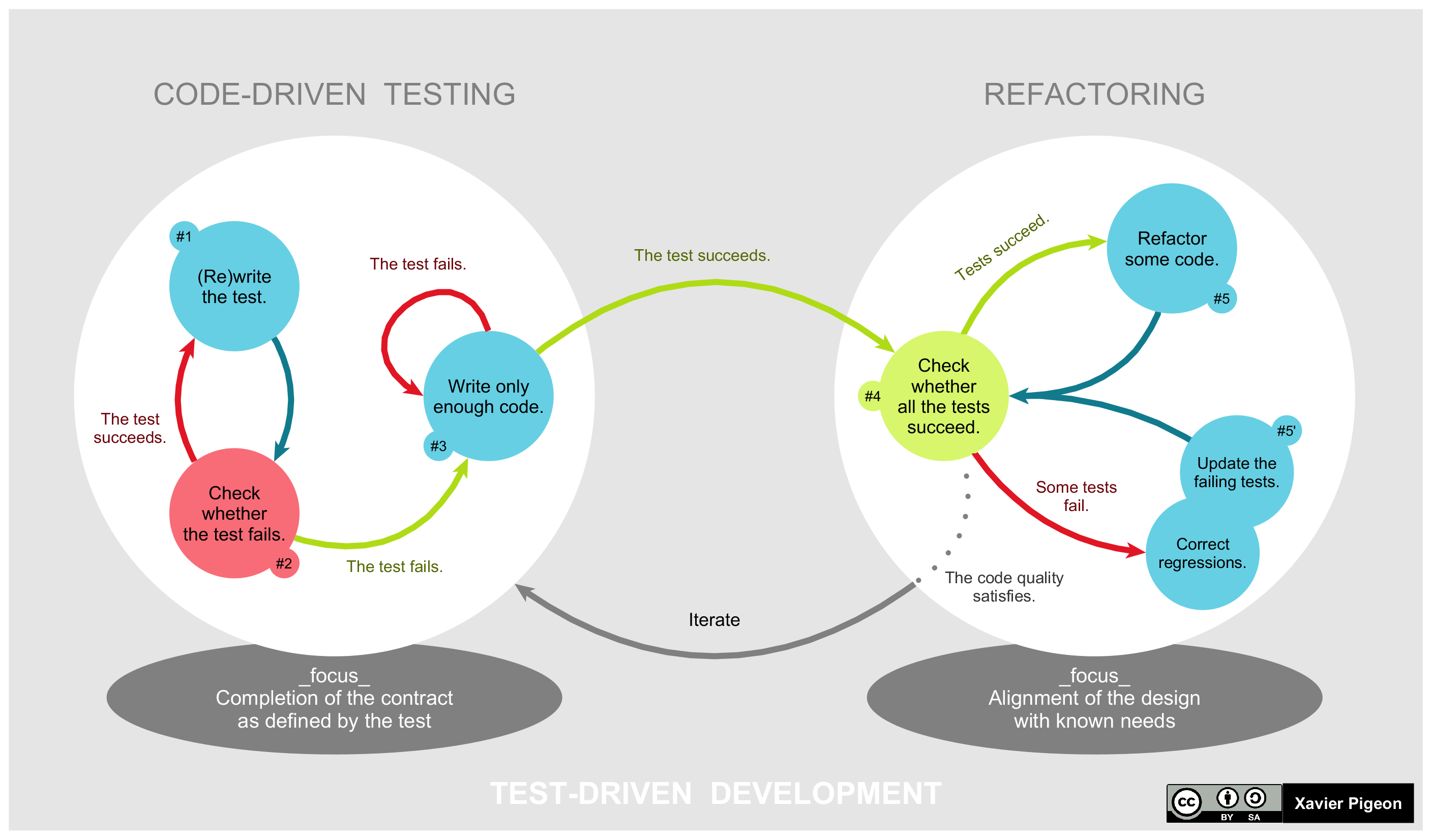
Picture of Test Driven Development
image source

I had a different topic on my mind for today but life and the internet have conspired to change my mind. Today seems to be about refactoring instead. I’m trying to upgrade a docker image to use some newer libraries and the definition of which versions of libraries are used/depended upon are scattered hither and yon. Where they’re defined at all and not just picked by a happy accident at the time things were set up. At the same time I got the latest pre-release part of Kent Beck’s Tidy First? on why you might want to do your tidying at different times in the lifecycle and saw the Code Whisperer’s article on What is refactoring? so I guess I’ll talk about refactoring instead.

Most of what I’m doing down in the depths of docker base images is refactoring. It’s Tidy FIRST. Moving definitions around and collecting them into fewer places. Using those definitions instead of specifying directly in all of the individual use cases. Making sure things still work. Adding some tests that work before any changes and making sure they still pass after the refactoring. When I get done there are no observable changes. Or at least that’s the goal.

Turns out there are some observable changes. Things didn’t actually work when I started, and it does me no good if it doesn’t work. So even before tidying is making it work. The world isn’t as static as some code might like. Some code isn’t as backward compatible as other bits of code would like. Some security systems have been updated and require a different set of keys than they used to. Some things have just moved. All of that needs to be handled. For example, what does RUN pip3 install --no-cache --upgrade nvidia-ml-py do in a Docker file? It installs the latest version of nvidia-ml-py, that’s what it does. It did that yesterday, last month, last year, and probably will next year. It’s good that it always does the same semantic thing. Unfortunately, the specific version it installs is going to be different in some of those cases. Which means a docker image built today, using the same version of Docker, and the same Docker file doesn’t always give you the same image. There’s an implicit external dependency in that line. A better choice would be something like RUN pip3 install --no-cache -r requirements.txt, where requirements.txt specified what version of libraries you want.

Which gets us to when to tidy. When you’re building that Docker file you don’t know what versions of which libraries you want, and getting the latest versions is probably a good place to start. Once it’s working docker images are immutable, so you know the image won’t change. (NB: While the image might be immutable, if you’re using tags and expecting consistency, think again). So this could be an opportunity for Tidy NEVER. The code won’t change. The image won’t change. Don’t spend more time on it than needed. There’s always something else to do, so why tidy?

In this case, it’s because it was reasonable to think that someone might need to update the image in the future. Which means making the process more immutable/repeatable would have been a good choice. Which moves us to the realm of Tidy AFTER. In this case you move faster by not locking the versions until you have things working. Once you have things working that’s the time to tidy. To use pinned versions. Leaving things in good shape for the maintainer.

But that wasn’t done. So here I am now, doing Tidy FIRST. Not just tidying. Not just the classic refactor of making the change easy, then making the change. First I have to make it work. Figure out the right versions. Make sure they’re being used. Get it back to working. Then I can do some tidying. Then do some more tidying, making sure things still work. Then, and only then, make the change.

Because, as the Code Whisperer said,

a refactoring is a code transformation that preserves enough observable behavior to satisfy the project community

That’s what a refactoring is. Sometimes though, you have to make it work before you can do one.

by Leon Rosenshein

Customers vs. Partners

Customers are and partners are different. According to the dictionary, it’s like this.

Customer: a person or organization that buys goods or services from a store or business.

Partner: any of a number of individuals with interests and investments in a business or enterprise, among whom expenses, profits, and losses are shared.

Or to put it more succinctly, you work for a customer, and with a partner. And that’s a huge difference. Your customers have different motivations than you do, with almost no overlap. Of course, your customer wants to buy the thing and you want to sell it, so there’s that overlap. They have a need to fill and you want to fulfill that need so there’s that overlap. But at the high level, your goal is to fill the need, but your customer wants it as a means to an end for whatever their purpose is. You succeed if they make the purchase. You don’t care if they succeed after that, with the exception that if they succeed they’ll buy more of what you’re selling.

Conversely, your and your partner’s motivations have considerable overlap. There might be some differences in the details, but you share the exact same high level motivations. You’re working together to meet the same external need or goal. You succeed or fail together. You succeed by working together to meet that external goal.

One big way this shows up is how influence flows. Of course, when you build something for a customer you should listen to them. If enough of your customers want something it’s probably a good idea to add it. How you build your thing will influence your customers. They’re invested in using the process and want it to work, so what you provide will influence them and their thing they’re building, but it’s a weak influence.

With partners the influence is much tighter/closer. You have more influence since you’re doing things together. It’s a collaboration. All sides get to state their wants/needs directly. You work together, in partnership, to come up with a solution that works for everyone. That fulfills the shared need of everyone in the partnership.

Being successful, regardless of whether you’re working with a customer or a partner, means you need to aware of those differences.

As important as that awareness is, it gets even more interesting when you’re a platform team working with internal customers or partners. But that’s a another story for another time.

by Leon Rosenshein

Best Practices and Cargo Cults

A best practice is a “method or technique” that often produces superior results. A cargo cult, on the other hand, is slavishly following the forms of something that you’ve seen work (or at least think works). The problem is that from the outside, and often from the inside, they look awfully similar. The question is, how can you tell the difference?

Actually, the difference is pretty straightforward. What makes seeing the difference hard is that it’s not in what you’re doing. In both cases you’re probably doing the same thing. In fact, the closer you’re following the original the more likely it is you’re cargo culting, not following best practices.

The difference lies in why you’re doing the technique. Cargo culting is simple. You do the technique. It goes something like this.

You’ve seen <successful team/company> do a thing. You read an article they wrote about what they did and how great it worked out. You saw tweet something similar, about how it’s the new hotness, the new best practice. You can’t afford the consultant, but you like the reported results and decide to try it out. They have donuts every Tuesday morning and lattes on Thursday afternoon. They have a shared doc that they all use to write down what they’re working on and update it daily. You can do that, so you try it out. And unsurprisingly, it doesn’t work. Nothing changes.

Best practices are harder to implement. You start by looking at the technique. Then you look at the context it was used in. You look at the culture. You look at the environment. You look at the problems they were trying to solve. Things like team and company size. How long the they’ve been together. What the communication patterns were before they tried the technique. You think about it and understand how they technique, when applied in that specific context, solved the problems.

Then you look at your context. You look at the problems you’re trying to solve. You look at how it’s the same as the original. You look at how it’s different. Especially how it’s different, because as Tolstoy said in Anna Karenina,

Happy families are all alike; every unhappy family is unhappy in its own way.

That’s critical. Because you can’t just blindly apply someone else’s solution, from their context, and to their specific problems, to your context and your problems. You need to look not at what they did, but why they did it, and what you can learn from their experience. Then you apply it to your context and your problems.

Or put more simply, Google has more engineers building and running their build system than you have total employees, let alone developers. The build tools and systems that work for them won’t work for you. Instead of building your own version of blaze/borg, figure out what’s really slowing you down and fix that.

by Leon Rosenshein

Applesauce, Names, and Refactoring

Did you know that applesauce can be an important part of refactoring, understanding code, and honest function naming? It’s true, and here’s how it works.

Picture of a bowl of applesauce

First and foremost, I’m not talking about mashed apples. As much as I enjoy applesauce on my latkes, that’s not what I mean. I’m talking about using applesauce as an honest name for something.

Naming is hard. It’s one of the two big problems in computer science. Names are also a design problem. You don’t know what you don’t know, so names are fluid. As you learn more about the domain (by spending time in it) and the system (by building it) you find that the names you’ve come up with are often, to a greater or lesser degree, wrong. And as your understanding grows, your methods start to accrete more functionality. So you end up with a method called AddUser which ends up updating a user’s profile and sending email if they haven’t logged on in 3 months. At some point you realize that you need to refactor the code. You need to split things up in to methods that do one thing and that have good names.

The problem is that you often don’t know just how to split things up. If you don’t know how to split things up how can you come up with a good, honest name? You probably can’t. One option is to not bother to try, or at least not bother to try, at first.

Which is where Naming as a Process comes in. It describes a process that enables you to go from working code to working code while adding useful information to method names. And it starts with applesauce. You don’t know what the method does, when you should call it, what it returns, or even why it exists. Calling it applesauce is the first step on the path to a completely honest, informative, intentional, domain related name. You don’t know what it does, and unless you’re writing an app that manages a kitchen or food storage system no one is going to think the name means anything. So no one will assume it does the wrong thing. They’ll have to look at it to find out.

You started with AddUser, then you went to applesauce. If you stop there, bad developer. No cookie for you. But if you follow the process the name will get better. Next you make it honest, if slightly ambiguous. Look at the method. What does it seem to spend the most time doing? It seems to be updating the user’s profile, and along the way it will at least create the user if it doesn’t exist and send email if they haven’t logged on for a while. And maybe something else. There’s some more code that doesn’t seem to have anything to do with users or profiles. So give it a name like UpdateOrCreateUserProfile_and_SendEmailToInfrequentUsers_and_somethingElse. It’s a mouthful, but it lets you and anyone else looking at the code know what you know it does, at least one of the side effects, and that you’re pretty sure it does something else as well. It’s not great, but at least it’s honest.

Now start extracting things. Run the process a few more times until you’ve got a set of methods, each doing one thing, called by a controller that understands what to do. Give each method an honest name that explains what it does, like AddUserIfNeeded, SendInfrequentUserEmail, and UpdateProfileWithLastAccessTime. That’s going to be pretty helpful to the next person to look at it. Just by looking you know what’s happening.

Unfortunately, you don’t know why. That’s the next step. Make the name intentional and domain relevant. Move some logic around so the controller decides what happens and the other methods just do things. Things like CreateNewWebsiteUser, SendUserEngagementEmail, and RecordUserInteraction. All inside a controlling method called TrackAndEncourageUserAccess.

Next time you (or anyone else on the team) steps into the code they’ll see not only what is happening, but why it should be happening. They can trust that any side effects are made clear. You’ll all be happier. Especially if you’re the Maintainer

by Leon Rosenshein

Policies

I’ve talked about Chesterton’s Fence before. It’s the idea that you have to understand why something was done in the first place before you decide to undo it. You buy a vacation house with a fence and a gate across the driveway and all you ever do is stop, open the gate, drive through, and then close the gate behind you. To save time and trouble, you remove the gate because all it does is slow you down. You come back a few weeks later and find that the wild goats have not only eaten your grass, but as they are wont to do, turned it into a goat desert, eating not just the grass, but the trees and shrubs as well. Now you know why the fence (Chesterton’s Fence) was there. It wasn’t to slow you down, it was to protect your landscaping.

As I mentioned before, you can see things like that in code. Input validation tests for things that should never happen. Error handling even when input is validated and the call should never fail. An extra watchdog timer wrapped around an event handler. You could take them out and things would be fine for a while. Probably for a long time. But remember, saying something hardly ever happens is the same as saying that it happens, so eventually there will be a problem. Until you can be sure the thing can’t happen you need to be ready for when it does.

Which brings me to policies. Policies are rules about when and how to do things. Sometimes they’re written down, like in an employee handbook, or even enforced by the system (like tests need to be run before landing a PR). Sometimes they’re part of the team/org’s minhag, the custom, handed down as tribal knowledge, where you get told how the team let’s downstream users know about planned changes and outages by using a certain format in a specific Slack channel. And sometimes they’re only found when you violate them, like the policy that says if you need some new hardware you could just technically order it, but you’d better ask the admin first and they’ll take care of it. Regardless of how you learn about them, they’re there.

The thing is, as redundant or arbitrary as they seem to be, they were almost certainly put in place as a response to something that happened. As Jason Fried said,

Policies are organizational scar tissue.

However, just because a policy exists, and that it might have made sense at the time, it might not make sense now. That’s where the rest of that quote comes in

They are codified overreactions to situations that are unlikely to happen again. They are collective punishment for the misdeeds of an individual. This is how bureaucracies are born. No one sets out to create a bureaucracy. They sneak up on companies slowly. They are created one policy—one scar—at a time. So don’t scar on the first cut. Don’t create a policy because one person did something wrong once. Policies are only meant for situations that come up over and over again.

The problem is that in general, policies don’t have expiration dates. In fact, it’s the opposite. The longer they’ve been around, the harder it is to change them. Which can be a problem. Because policies are set in isolation from each other. And they accumulate. They can even conflict with each other. So you have to be careful when setting policies.

You probably don’t need a policy the first time something happens. You need to think about how likely it is to happen again, the cost of having/living with the policy, and what the cost of it happening again is. Unless the cost of it happening is greater than the cost of it happening, consider it as a teaching moment and remind people of the goals and consequences. Just send an email to the right group of people.

Instead, use policies for things that happen multiple times and have a very high cost that you can’t (easily) put a mechanism in place to prevent. If you want to make sure tests are run on every PR/commit, don’t make it a policy and hope folks do it, make it a part of the system so they don’t have to think about it. On the other hand, if you want to let your customers know about upcoming downtime or service interruptions, make a policy, write it down, and make sure everyone knows.

Finally, put a re-evaluation date on your policies. Write down why the policy is in place, what it’s goal is, and ideally, what criteria need to be met to remove the policy. For instance, you might have a policy to run unit tests today, then re-evaluate it every week while you build the mechanism to do it automatically. Once the mechanism is in place you can remove the policy.

And if you find a policy you don’t understand the reason for, remember Chesterton’s Fence. Don’t just remove it because you don’t know why it’s there. Figure out why it’s there, decide if it’s still needed, for that or some other reason, and then make a decision to keep, modify, or remove it.

by Leon Rosenshein

This Is The Way

I’ve talked about The Unix Way before. I recently came across a really good description of it. It doesn’t matter if you’re writing a tool or deciding what goes into your commit. It shows up in architecture, in Domain Driven Design and Bounded Contexts. It shows up in non-code places as well. Reducing Work In Progress is just another way of implementing the Unix way.

The best definition of the Unix way I’ve ever seen is:

That’s it. Two things. Simple and straightforward. Of course, the devil is in the details.

First, what is the one thing? Where are the boundaries to that one thing? Are you writing a program, a library, a service, or a platform? Where the customer value comes from drives the boundaries. Where the boundaries are drives what you’re building. But it’s not done a one-way flow in isolation. It’s actually a system with feedback loops, so boundaries influence what the “one thing” is which then ends up influencing how it gets used, which influences customer value. And now we’re talking about levels of abstraction. You can always add another level of abstraction to help solve a problem (except the problem of too many levels of abstraction. The trick is to figure out if you should or not.

A really good way to approach this one is to recognize that it is an iterative process. Understand the domain and the context. Figure out what you need to do. Figure out what you shouldn’t do. Then look at everything you think you need to do and decide if you really need to do. At any given level you can probably do less, then use composition at a higher level. Even if you never share that lower level with the end user, tighter domains and less coupling will help you. Now and in the future. At the same time, don’t be afraid to merge two contexts or rearrange a group of them into things that make more sense. As you design, your understanding grows. As your understanding grows the boundaries will shift. Use that to your advantage.

Second, how do you tie things together? In classic Unix, the text output of one program is used as the text input to the second. For CLI tools that still makes sense. But lots of things don’t run from the command line. They’re driven by user clicks/taps on a screen, and they might not even run on the same computer. Which means you can’t use your favorite shell’s pipe mechanism. In fact, you need to think about how to tie things together across computers. Data size has grown as well. By multiple orders of magnitude. On Falcon 4 we shipped our entire game on a single CD. Less than 680 MB, including all of the art assets. More recently, for the Global Ortho project each individual image was ~550 MB, and we had over 2 million of them between the US and Western Europe. Even one of those images is a lot of data to pass via a pipe, let alone hundreds or thousands of them. And since you don’t know what’s going to be reading your data you don’t know what language the next thing is going to be written in, so your access needs to be cross-language.

The key to solving this issue is to add structure. But only as little structure as you need. And document it. Cleanly, clearly, and with examples. Consider using a formal IDL like Protobuf or Apache Thrift. They’re great for ensuring you have a single source of truth for the definition while letting you have language specific implementations. They can be used on distributed systems (across the wire) or through persistent stores like file systems or databases. You can even use them as part of your API in a library to keep things consistent. Even if you’re using text for a CLI tool, a little structure will make your life easier. YAML and JSON are good choices. And remember that it’s often useful have text output that’s formatted in a way that makes it easy for people to understand (columns, colors, complete sentences, etc.) and a machine parseable format. With clean, clear documentation.

The Unix Way has been around for almost 60 years. Despite the advances in processor, storage, language, and network design and implementation, it’s still as relevant today as it was back then.

by Leon Rosenshein

TDD Anti-patterns

I’ve talked about the difference between Test After Design and Test Driven Design before. I’m a big proponent of writing tests that prove your design before you write code. Not all the tests, because as your knowledge of what the design should be improves, you’ll learn about new tests that need to be written as well. So, as you learn you write more tests to drive the design.

Regardless of when you write the tests, before or after the code, there are a bunch of test anti-patterns to watch out for. Anti-patterns, or code smells, as they’re sometimes known, aren’t necessarily wrong. They are, however, signals that you should look a little bit deeper and check your assumptions.

TDD anti-patterns are definitely not a new idea. A slightly repetitive list was published over 15 years ago, and consolidated about 10 years ago. The shorter list is still a valid list today.

Check out the list yourself for the full details, but here’s a few of the ones that I see getting implemented pretty often:

The Liar

The liar is a test that doesn’t do what it says it’s doing. It’s testing something, and when the thing it’s actually testing isn’t working it fails. An example would be a test called “ValidateInput” that, instead of checking that the method properly validates its input parameters, is actually checking to make sure the result is correct.

The Giant

The giant is a test that does too much. It doesn’t just test that invalid input parameters are properly handled. It also checks that valid input gives the correct answer. Or it might be an integration test. Something that requires way too many things to be working properly for the result of the test to tell you something. One important note here is that a table-driven test that tests all possible combinations of invalid inputs in a single test function is not a giant (as long as each entry in the table is its own test). It’s just a better way to write small tests

The Slow Poke

The slow poke is just that, slow. It takes a long time to run. It might be waiting for the OS to do something, or for a real-world timeout, or it might just be doing too much. Tests need to be fast because entire test suites need to be fast. If your test suite takes minutes to complete, it’s not going to be run. And a test that doesn’t get run might as well have not been written.

Success Against All Odds

The success against all odds test is the worst of all. It takes time write. It takes time to maintain. It executes your code. Then it says all tests pass. Regardless of what happens. It could be you’re testing your mock, or, through a series of unfortunate events, you’re comparing the expected output to itself, or even worse, forgot to compare the output to the expected output. Regardless of the reason, you end up with Success Against All Odds, and you feel good, but you haven’t actually tested anything. You haven’t increased anyone’s confidence, which is Why We Test in the first place.

So regardless of when you write your tests, make sure you’re not falling into any of the anti-patterns by mistake or by not paying attention.

by Leon Rosenshein

Monitoring vs. Observability

Pop quiz. What’s the difference between monitoring and observability? First of all, Monitoring is a verb. It’s something you do. You monitor a system. On the other hand, Observability is an adverb. It’s one of the -ilities. Observability describes a capability of a system.

Monitoring is collecting logs and metrics. Metrics like throughput, latency, failure rates, and system usage. Monitoring is going over logs and looking for issues, patterns, and keywords among other things. Advanced metrics include some way of tracing through a system, whether it’s a distributed system or not. And in many cases, you compare the results to a threshold and fire some kind of alert if that threshold is crossed.

Observability is the ability to know and understand the system’s current state by looking at the metrics. Not just the explicit bit of state you get from the logs and metrics, but the overall system state. Not just if some threshold of a particular metric has been crossed, like how much RAM is being used, but why that amount of RAM is being used.

In other words, good observability includes monitoring, but just having monitoring doesn’t mean you have good observability.

In a system without good observability, if you’ve got a good understanding of your system, you can look at the metrics and deduce if there’s a problem. You can look at the logs and work back from the problem/error and identify where there’s a log message that shows where the problem started. In that case you might be able to use metrics to find the root cause of why a threshold was crossed (and an alert fired that woke you up at 2 0’clock in the morning).

If you don’t have that understanding then what? You start reading code. And tracing it. Looking for code paths that might have caused the issue. You might search for where log messages are being generated and try to understand why. You’re trying to build understanding of the system and rebuild the internal state of the system at the same time. Meanwhile the fire rages.

If your system has good observability then you don’t need that deep understanding. The metrics (and logs and traces) point you to where the problem is, not where the symptom surfaced. So when your p95 response latency crosses your threshold you know not only what happened, but what caused it.

And you usually want that ability. Because at first, before you fully understand a system you need help figuring out why something when wrong. Later, you understand the system. You’ve put in mechanisms to deal with issues you’ve learned about. You’ve got good metrics to tell you about that state just in case something does happen. So what happens next? Instead of the problem you understand, something you don’t understand happens. Something where your deep knowledge of the system isn’t deep enough. And you’re right back to the not understanding state.

Which is why good observability is so important.