Recent Posts (page 18 / 71)

by Leon Rosenshein

Where do defects come from?

For those that know me, it’s no secret that while I like a lot of Uncle Bob’s specific advice (clean code, unit tests, I have some problems with his overall approach. Consider his response to the question “Where do defects come from?”.

According to him, the cause is:

  • Too many programmers take sloppy short-cuts under schedule pressure.
  • Too many other programmers think it’s fine, and provide cover.

And the obvious solution is

  • Raise the level of software discipline and professionalism.
  • Never make excuses for sloppy work.

It’s true that as software engineers we need to do a better job, have more discipline, and not make excuses for those that don’t. Raising the bar on how we do our jobs is vitally important to eliminating defects.

But it’s not enough. You can always find someone who typed the line of code and blame them for the problem. There’s even a git command, blame to do just that. But it’s kind of disingenuous to stop there.

I’ve been doing this a long time. In all my years as a software engineer, I’ve never run into a co-worker who didn’t care. Some had more information than others, and some had different experience and viewpoints that let them see things others missed. But no-one thought sloppy short-cuts were OK to take or that it was OK if someone else took one.

I’m much more partial to Hillel Wayne’s approach to thing. Not just in this case, but in many others. He takes a much more nuanced approach. He avoids the Tyranny of Or Yes, someone typed that line, but the defect has a deeper cause than that. Why was that line allowed to be typed? Could we have added guardrails to at least prevent it from getting into user’s hands?

It’s because for all but the simplest bits of software, running in all but the simplest environments, it’s not just one developer, or even one team of developers that wrote the code. The code uses libraries and OS functionality from somewhere else. Someone else built the environment. The hardware the code runs on and the network it’s connected to are managed by someone else. It’s part of much bigger, interconnected, and interdependent system. To say that one person is responsible for an error in such a system isn’t accurate.

Which is not to absolve developers of responsibility for defects. They need to have discipline and be professional. There is no excuse for sloppy work. But it’s not enough. We also need to ensure that we have, and use, all of the tools at our disposal to not just find defect, but even better, keep them from happening in the first place. Because the goal is to make sure the defects don’t reach the customer, not figure out who to blame for them.
by Leon Rosenshein

A little housekeeping

It turns out, unsurprisingly, that having 500+ blog posts in a single directory isn’t a great way to run things. To that end, I’m moving a bunch of stuff around. To you the user there isn’t much change. The new links are of the form /posts/<year>/<month>/<day> instead of /posts/<year>-<month>-<day>. If you’re following a link with the old format it should still work, but if it doesn’t, you’ll get a message saying it’s unavailable and a link to the new format.

I’m pretty sure I’ve fixed all of the internal links, but there may be a few I’ve missed. If I’ve missed something just shoot me a quick note and I’ll fix it. While you’re waiting you can do the manual translation. For me, though it makes things much easier under the covers. For anyone who’s having problems finding things, I appologize. This new system should work for the next few years at least :)

thanx

leonr

by Leon Rosenshein

Elevator Pitch

I’ve talked about vision and mission statements before. I’ve talked about strategy and charters too. Visions, charters, and strategies are big things. They can take a page or more to write down, a long time to describe, and even longer to really understand. Mission statements are often just as bug.

But there’s one kind of mission statement that isn’t big. It doesn’t take that long to explain or understand. When you hear it, you know exactly what the mission is, and if you are part of that mission, you also know exactly what your role in achieving that mission is. That kind of mission statement has another name. The Elevator Pitch.

The elevator pitch comes to us from Hollywood. The story goes that if you had a project you wanted to get made and didn’t have a well-known name or portfolio and wanted to get a chance, you’d somehow manage to get yourself in an elevator with someone who did have the power, budget, or connections needed to get it made. Then, while you were in the elevator with that person, you’d make your pitch.

The elevator was a great place to make the pitch because there were no distractions and the person couldn’t leave. On the other hand, elevator rides are short. A minute of two at best. You didn’t have a lot of time to make your pitch. This one simple constraint drives the elevator pitch more than any other.

Which means your elevator pitch needs to meet a few requirements. First, of course, it needs to be short. It also needs to be clear and complete. That’s hard enough to do. But it’s not enough for an elevator pitch. It also has to be catchy. It has to grab the listener and make them want to know more. Make them want to get involved. Make them want to help you get your project made.

Making a company’s mission state also be an elevator pitch add yet one more level of difficulty. Because there are two very distinct types of people who you need to craft your elevator pitch for. The first is the people outside of the company. The customers, users, critics, shareholders, and investors. Those people need to know what you’re doing, what is good for them, and what you consider success.

The second is the people inside the company. They often have a lot of overlap with the first group, so all of those things are important to them, but the elevator pitch also needs to tell them what they need to know so they can do their part in executing the mission. And by the way, while you tell those internal folk what they need to know, you don’t want to scare off the people outside.

It’s a lot of work to craft such an elevator pitch. Lots of things that need to be included. Lots of constraints that you need to honor. But, done right, a mission statement that is also a good elevator pitch can drive a company (or team, or even an individual) far beyond where they might have gotten without it.

Consider Microsoft’s early mission statement, “A computer on every desktop, (running Microsoft software)”, or Uber’s early one, “Transportation as reliable as running water”. Both are very short. They are simple to understand. You know what success looks like. From outside the company, you know what the company is doing and how you’ll be better off after it comes to pass. From inside the company, you can look at every decision you make while doing your job and make the choice that drives the mission.

So what’s your company’s mission statement/elevator pitch? Do you have a pitch or just a mission statement? What about your team? Or yourself? If there isn’t one, should there be? What can you do to make it happen?

by Leon Rosenshein

Why We Test

We test to find bugs, or at least make sure there aren’t any, right? Wrong. Or at least it’s not just about finding bugs. Finding/eliminating bugs is one of the specific things we do as part of testing, but that’s not the goal. It’s not about lines or branches covered. It’s not about having tests pass or dogfooding. All of those are things we should do along the way, but they’re not the reason we test.

I think Dan North said it really well.

The purpose of testing is to increase confidence for stakeholders through evidence.

That’s why the things we do, fallbacks, guardrails, formal analysis, input validations, code reviews, unit tests, code/branch coverage, integration tests, dogfooding, etc., are important. These things give us concrete numbers that describe things we know about the code and the system. They are how we provide the evidence needed.

That data lets us show how we have reduced risk in different ways. They’re not foolproof though. We don’t test all possible combinations or sequences of inputs. Even tools like TLA+ can’t guarantee correctness. All we can do, especially in a complex system is increase our confidence (by reducing risk). Risk analysis is a complex topic itself for another time, but for simplicity, risk and confidence are inversely related. Reducing risk increases confidence.

Just understanding that isn’t enough for the people designing/implementing/running the tests. You have to understand who the stakeholders are and what’s important to them. Stakeholders are everyone impacted by you building the thing under test. Not just the users, direct and indirect, but you as the builder, your team, your manager, and your company. Each of them have different views, different requirements, and different levels of acceptable risk. Depending on who and what you’re doing you could be in many different stakeholder groups. You may also be completely separated from one or more of them. You still need to understand them and what is risky to them.

Because at the end of the day, we’re building things to add value for some group of people. We test to get the confidence that what we’re building will do what it’s supposed to an acceptable level for those people. That’s why we test.

by Leon Rosenshein

Careers Pt 3 - Visualizing Progressions

In part 1 I talked about how your “level” or title was just a way to describe the scope of influence you had. Just a measure of how much your work, and how you worked, impacted others. Part 2 explained more about what I meant by “scope”. What the parts of scope were and how scope could grow.

Being able to describe how that works is crucial to managing your career. Just as important is being able to describe it to others and to visualize it. That lets you discuss it with others. Because while you’re responsible for your own career, you aren’t alone in a vacuum. Being able to visualize where you are in your career and your progression through your career lets you understand where you think your gaps and opportunities are and compare them to what those around you think.

To that end, I’ve been playing around with a bunch of different visualization formats. I wanted to show 3 different values for each of 6 different areas in one place. I tried text, line graphs and bar graphs, but none of them really captured what I wanted. Eventually I settled on a radar plot with an overlay and accompanying text.

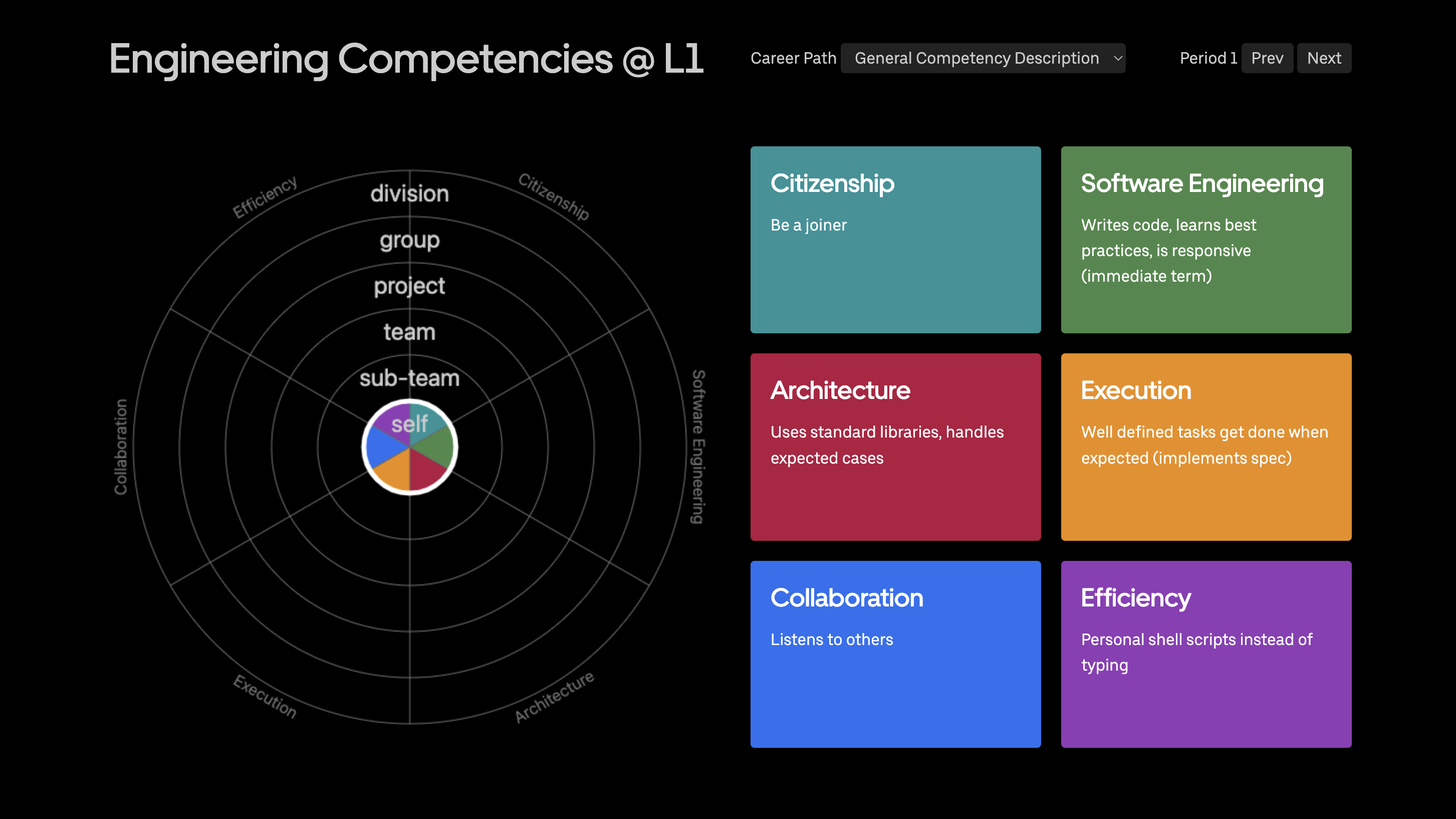
Radar plot of scope at L1

The radar plot breaks the circle down into the 6 “competency” areas. The different rings represent the scope of influence for each level (self, sub-team, team, project, group, or division). Then, for each section of the circle the colored arc represents what you (or whomever is creating the plot) considers your scope of influence. Finally, you can overlay a circle on the plot with your current level. The text area gives you a place to describe significant information/events that led you to pick that particular scope of influence for that area. I’ve put together a progression of radar plots that lay out expectations in each area at each scope.

Where this gets really interesting and useful is when you use it to manage your career. Pencil in where you are on the radar plot. Then get your manager to do the same. Once you have both, compare them to expectations. If both you and your manager agree you’re exceeding expectations in all areas then you have an easy discussion about next steps. If you and your manager agree and there’s a gap between where you are and expectations then the conversation is still pretty easy. Identify the gaps and discuss what you can do more/less of or new areas to move into to close that gap.

If you and your manger disagree on where you are then you have a harder conversation, but it’s the one that’s probably most important. Making sure the two of you are on the same page is the single most important thing to managing your career. Those gaps indicate places where the two of you aren’t on the same page, so that’s what you need to be talking about. It might be expectations. It might be visibility. It might just be lack of awareness. Whatever it is, now that you know about it you can (and should) do something about it.

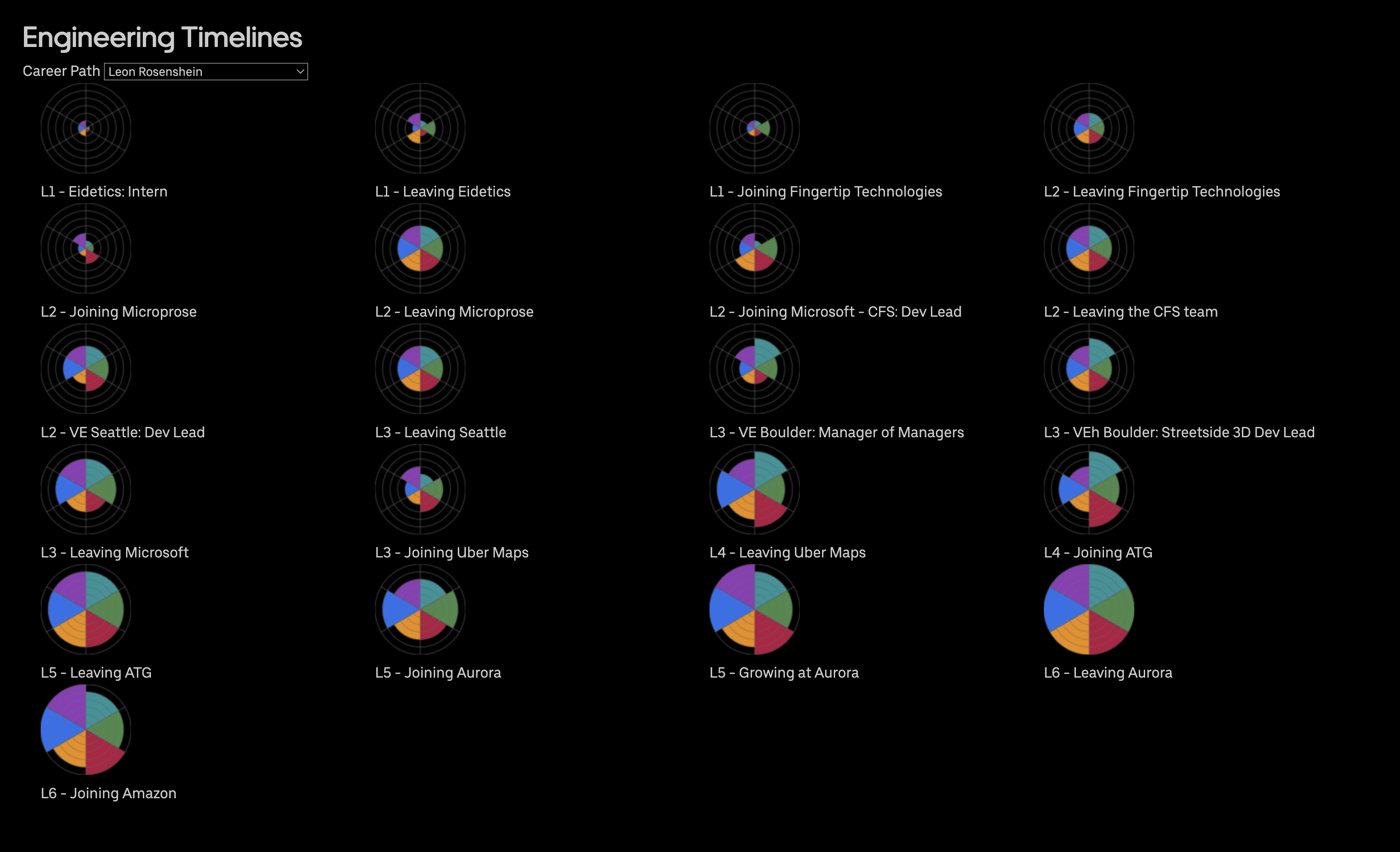
Finally, one last things you can do with these visualizations is look at them over time. I put one together for my career. It’s a lot of things, but one thing it’s not is smooth. And that makes sense. Over time, particularly around job changes, you perform at different levels. Don’t be surprised when it happens. In fact expect it. Take the time to look around, identify the gaps, then close them and move on. That’s owning your career.

A series of radar plots showing my progression and scope of influence as I changed jobs and roles over the years

If you’re really interested, you can see my history (and a couple of “generic” career progressions I’m putting together for discussion purposes) in the Eng Stories area.

by Leon Rosenshein

Action vs. Reaction

Bias for Action is one of Amazon’s Leadership Principles. Bias for Reaction is not. They sound very similar. And from the outside they look very similar. But from the inside they’re very different.

Bias for action is about making decisions. It’s about being thoughtful and using the information you have at hand to make a good decision. It’s about understanding the options and then deciding amongst them.

Bias for reaction, on the other hand, is about doing something, anything, instead of taking the time to think and make a decision. It’s about motion. It’s about not appearing idle. It’s about looking like you’re invested in the situation.

Bias for Action is a good thing. Bias for Reaction, not so much. The key is to understand that difference and then act on it.

As part of Amazon’s leadership principles, Bias for Action is described as

Speed matters in business. Many decisions and actions are reversible and do not need extensive study. We value calculated risk taking.

Or, in other words, when faced with an reversible decision, use the information you have and make the best decision you can. Then move forward. If you need to change it later, change it then. Don’t agonize over the decision and don’t let yourself end up with “Analysis Paralysis”.

At Amazon the key to making decisions at speed is understanding whether the decision you’re making is reversible or not. Whether it’s a one-way door or a two-way door.

A two-way door is decision that is simple to make and if you choose to, simple to unmake. Realize you’ve stepped through a door into the wrong conference room? Step back through the door and find the right room. The cost of getting through the door either way is about the same and pretty cheap.

A one-way door is like the emergency exit at the bottom of the staircase. The one that says “No Re-entry To Building” and when you get outside there’s no door handle. If that door closes you can’t just step back in. You have to expend a lot more energy (pounding on the door and hoping someone responds or walking around to the main entrance) to get back in.

Bias for action means first understanding if you’re about to go through a one-way or two-way door. Before you can make a decision on what to do, you have to decide what kind of decision you’re making. Then you make your decision. With the appropriate amount of research and study.

That’s Bias for Action. Not doing that is Bias for Reaction. And that can get you in a lot of trouble.

by Leon Rosenshein

Story Splitting

The typical user story starts something like

As a <persona>, I should be able to <task to complete>

That’s a decent format, or at least it’s a minimum bar. Without identifying the kind of user and the task to complete it’s really hard to compare tasks to identify which has the highest value. However, it is by no means a guarantee.

There are 2 really common reasons that this template doesn’t guarantee that you end up with a quality user story that you can implement. The first is that there’s no mechanism to ensure that the task the user is trying to complete is actually a task that adds business value and not just an activity along the way to completing a task that adds value.

The canonical example of this is the login user story. You know, the one that reads something like

As a return website customer I should be able to login to the website.

That story hits all of the requirements of a user story. The customer is clear. The task is clear. Acceptance criteria, while not explicitly listed, is clear. Even with all that, it’s not a good user story. It’s not a good user story because the task, logging in, doesn’t add any value. It’s an activity that needs to be done, so by all means, do it. But if all you did was add the ability to log in to the site then you wouldn’t be adding value. You’d also be making your customer’s life worse. They would need to jump through some hoops, but things wouldn’t be any better.

A better user story, with a task that adds value, would be something like

As a return website customer I should be able to order the contents of my shopping cart using my securely stored personal information.

Do you need to be able to log in? Maybe. You need to access securely stored information. Logging in is one way to do that. But there are other mechanisms for authentication. The user story is not the place to specify the mechanism. The team should figure out the mechanism by looking at the situation. And once they have the mechanism determined/implemented, they can then use it to ensure that secure personal information is used. The customer doesn’t need to enter information every time and you don’t need to send the info over the wire making things even more secure. And that adds user value. When the story is done the user is measurably happier.

The other common reason, and the one I see more often, goes the other way. The story is too broad.

As a return website customer I should be able to buy something

That is certainly something a customer wants to do, and doing it adds value, but where does the story start and end? That story covers just about every e-commerce site ever made. To really be useful and completable in a reasonable amount of time it needs to be split up into many more much smaller stories or scoped down to what the story really means. That story is probably a conflation of at least stories for browsing, adding items to a cart, setting delivery address, and making payment. I needs to be split up into those stories. The challenge there is to not split the story up so far that it turns into a task list (see above).

Right-sizing stories is the key to making useful user stories. Making them big enough to actually add value, but not so big that they can never be completed. Tim Ottinger has a good list of resources for splitting stories.

by Leon Rosenshein

Careers Pt 2 – Breaking Down Scope

In Part 1 I described how your level is a proxy for scope of influence. Knowing that gives you a framework to understand where you think you are. What it doesn’t give you a way to break scope of influence down into a series of areas that you can measure.

One way to do that is break down scope into categories. Different companies call them different things. Some call them competencies, proficiencies, or areas, others might call the capabilities or skills, It doesn’t really matter what they’re called, as long as everyone is talking about the same thing. In my experience they’ll usually map to different competencies that cover these 5 areas.

Competency Breakdown

Citizenship

Citizenship is how you support the company outside of the company’s lines of business. Things like being an active interviewer, onsite and offsite, presenting on behalf of the company at a conference, or contributing to an open-source project. It’s being part of or leading an internal employee group or donation project.

Software Engineering

Software Engineering is the one of the core competencies for the engineering role. It’s about writing code and use/promoting/defining best practices. It’s building something that works now and is scalable enough to work for the future. For other roles, such as PM it would be about project management and finding customer value.

Architecture

Architecture is the other one of the core engineering competencies. Architecture is about interfaces and designs and ensuring things work when then need to can change to handle new requirements. It’s about deciding what to build, what to buy, and what to stop doing. For other roles, like PM, it will be related to the role. For them it might be about what to features to build or not build.

Execution

Execution is getting things done. Getting them done on time. Regardless of whether it’s a current, short-term project, a multi-year project or strategy, spans multiple people/teams/groups or even companies.

Collaboration

Collaboration is a measurement of how well you work with others. The people working on the same functions, the people on your team or a larger organization or in out outside of your industry.

Efficiency

Efficiency is about doing more with less. Using fewer resources, people or compute. Finding and eliminating duplications. Sharing the shareable. Automating the automatable.

Once you know what those competencies are, you need a way to measure you scope in those areas. That breaks down into two areas, time and impacted people. The breakdown for the different areas looks something like this

Time

  • Immediate/Right Now
  • ~ 6 months
  • ~ 1 - 2 years
  • 3 - 5 Years
  • 5+ years

Impacted People

  • Yourself
  • A feature team (2 - 3 people)
  • A team
  • An org/division
  • Your company / industry

Combined, the competencies and the scope areas give you something you can mostly measure. What you DO with those measurements and how you think about them will be covered in part 3.

by Leon Rosenshein

Scheduling Time For Maintenance

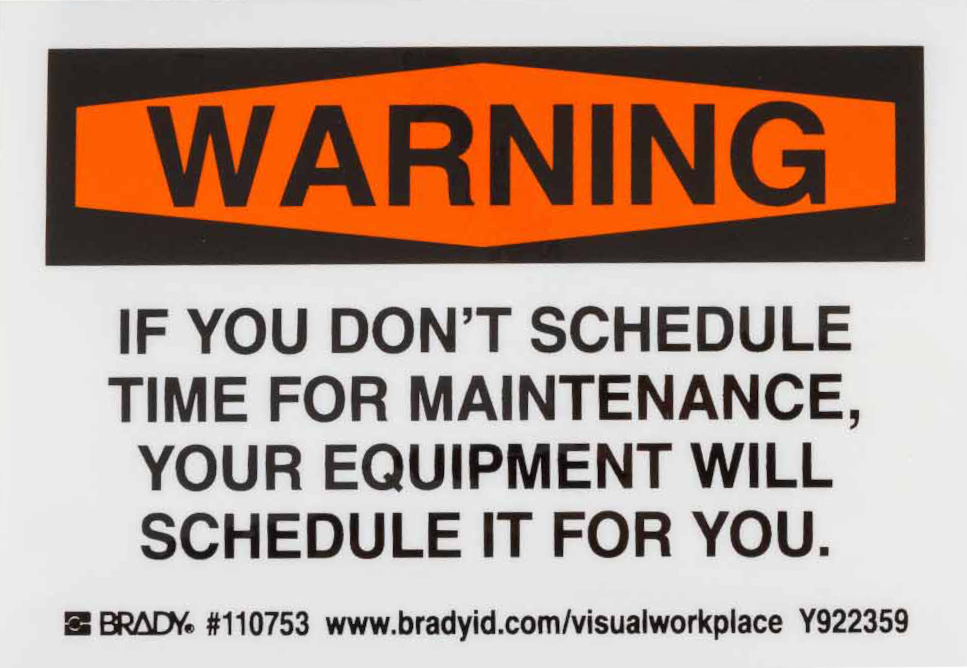
This is a real thing you can buy.

Sign that says Warning: If you don't schedule time for maintenance, your equiopment will schedule it for you

Brady is all about labeling for the workplace. They’re primarily aimed at the manufacturing/processing space. They’ve got a product line directed at lean manufacturing techniques, such as those that come out of the Toyota Production System (TPS), which I’ve talked about before. Since a lot of today’s agile and lean software development processes are derived from TPS and lean manufacturing some of them make a lot of sense in the software world as well.

We don’t have machines or storage racks that you could put that sticker on, but putting it somewhere prominent, like on your laptop or next to your monitor, so you don’t forget about it might make sense.

But what does it really mean for software? After all, no matter how many times you run an executable or iterate over a loop the ones don’t wear down to .6 or .7 and the zeros don’t start to fill in and turn into .3 or .4? The code, barring disk errors and cosmic rays, doesn’t change.

There are a few things that maintenance implies with software. Unless you’re running on an embedded system and there is no operating system you’re relying on third party code. And even if your code is perfect there are going to be changes and updates to someone else’s code you want to use. It could be to pick up new features or better performance, or it could be to close a security loophole, like the log4j issue. So there’s always a reason for maintenance.

Even without those reasons for maintenance, you probably want to do something to the code. Add a feature. Respond to new business requirements. Reduce support burden. All of those things are maintenance. And sometimes, to enable that kind of maintenance, you need to do internal work. To keep the external software quality (ESQ) high, you need to work on the internal software quality (see ISQ vs ESQ).

That’s where scheduled maintenance comes in. Doing the extra work so you can do the required work. The unseen work that lets you keep your velocity up. The unseen work that lets you respond to changes in the environment quickly. The unseen work that lets you add value.

Which means there is value in that unseen work. So don’t skimp on it.

by Leon Rosenshein

Error Based Development

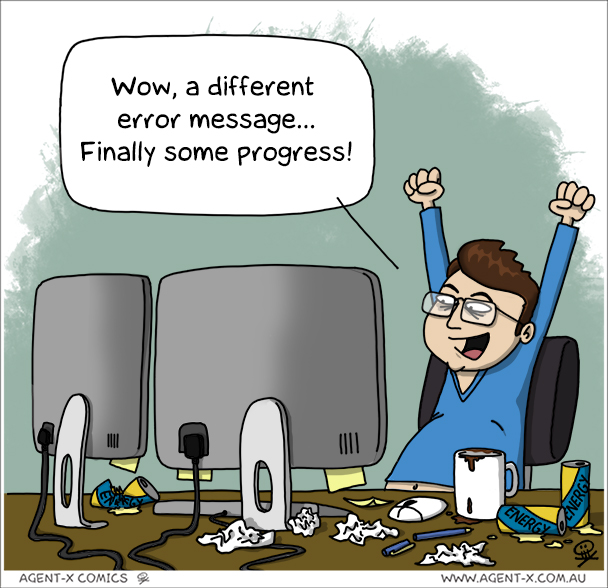
Wow, a different error message... Finally, some progress

I’ve often (usually? almost always?) found it easier to write code than it is to debug it. Even code I recently wrote. If nothing else, when I’m writing code I have all the context in my head and I know how all of the API calls are going to respond. Even if I’m wrong, I know what I’m expecting and I write the code accordingly. Of course, that’s not always the case, which leads to debugging.

Some days the debugging is easy. I can look at the incorrect result, error message, or stack trace and know what I need to do to fix the problem. Other times there’s enough info to point me at a section of the code and I can trace it through and find the issue. I can try different inputs and write special debugging code to help me understand what’s going on.

Other days though it’s a struggle. The error messages don’t help. Code inspection gets you nowhere. Debug code doesn’t even help. No matter what you do the error keeps happening and you get no extra information. This happens most often with 3rd party libraries and web calls because all you’ve got is the documentation. So you try changing something as a way to map the boundaries of the problem.

And nothing changes. Google searches. Stack overflow. The expert on the team. Nothing helps. So you go back to first principles and build a walking skeleton that has just enough meat on the bones to work. Then you keep adding to it until it breaks the way the thing your debugging breaks. Or conversely, you start taking things out of the broken thing until something changes.

Then you can really start debugging. You’re back in control of the system. Or at least having some kind of influence over it. Because without being able to influence the system you can’t characterize the problem or drive to a solution.

There have been countless times this has happened to me. I’ve worked for hours trying to vary the inputs subtly so that I can understand how the system is actually responding. Trying to get to the point where the error is in code I have influence over. So that I can fix it.

But as annoying as that is, it reminds me how much better things are now. Where I can click a button or run a single command and the system makes sure that I’m exercising the code that I’m working on. Not like things used to be. Before Makefiles having nothing happen was common. To actually see your change was a multi-step process. Change the code in some editor. Save the code. Compile the code. Link the code (at however many levels are needed). Run the new executable. Miss any one of those steps and nothing changes.

Sometimes I miss those days :)